
Mission Cloud Secure
Fully Managed Security, Detection, & Response
Contents
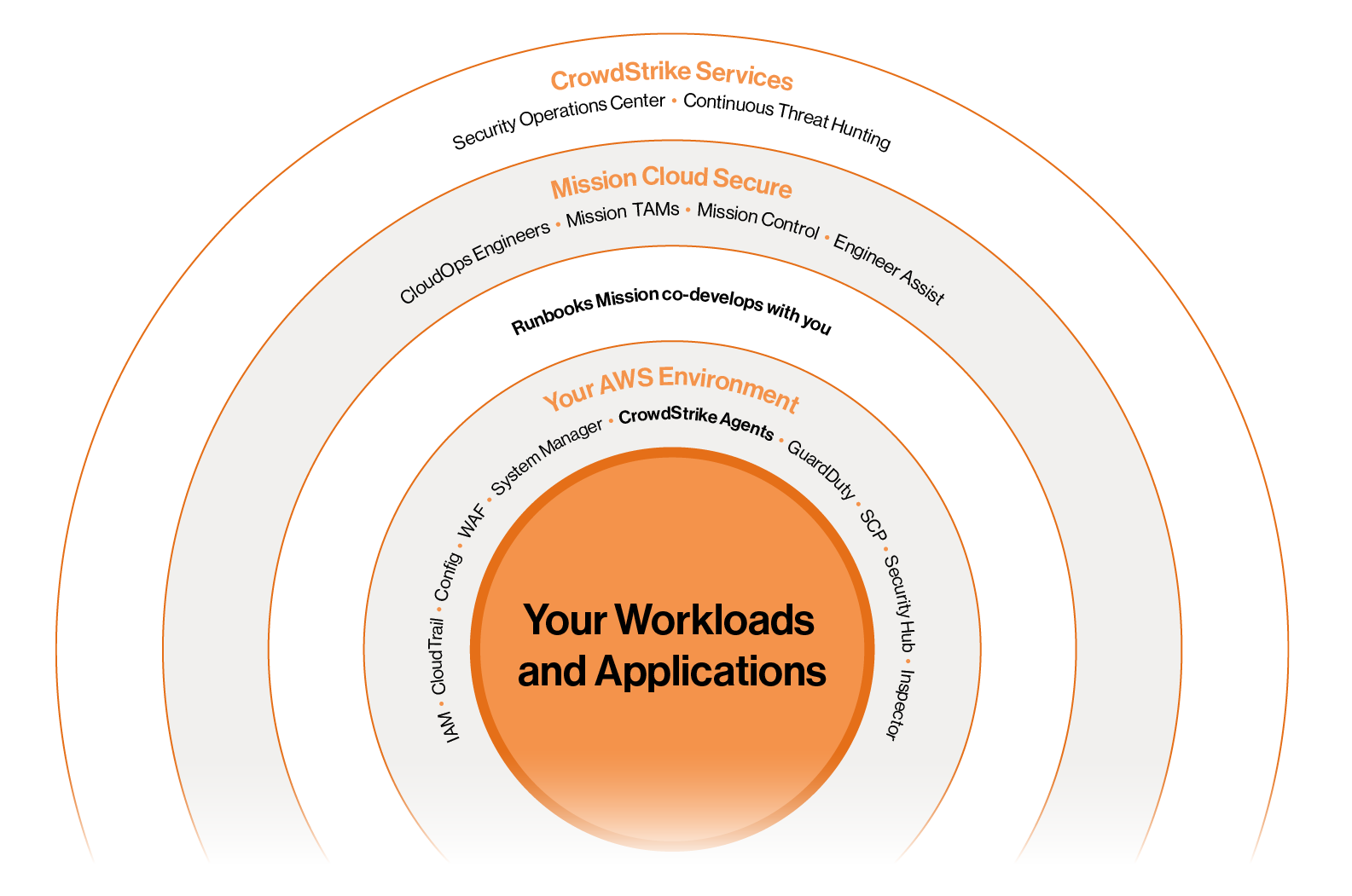
Mission Cloud Secure is Mission's comprehensive security software solution for AWS environments. We deploy world-class tooling and a team of AWS experts to help secure customers' operations and cloud against misconfiguration, CVEs, breaches, stolen credentials, and bad actors from individuals to nation states.
Our 24/7 support helps configure and tune CrowdStrike alerting, remediate detected issues, develop incident response runbooks, and guide you on security best practices, while providing comprehensive protection through CrowdStrike's industry-leading Falcon Complete platform.
.png)
The Five Pillars of Mission Cloud Secure

24/7 SUPPORT FROM MISSION
Expert support to deliver CrowdStrike configuration, alert remediation, incident response runbooks, and security best practices

COMPREHENSIVE SECURITY
Comprehensive security for AWS, endpoints, identity, and vulnerabilities

CROWDSTRIKE FALCON COMPLETE
CrowdStrike’s most comprehensive security services

CONTINUOUS THREAT HUNTING
Continuous threat hunting in partnership with CrowdStrike, law enforcement, intelligence and defense communities

24/7 SOC
24/7 SOC for managed detection and response


Mission Cloud’s team of CloudOps Engineers works directly with the CrowdStrike SOC to give customers 24/7 managed detection and response. Mission alerts customers to incidents and helps the SOC to respond with the runbooks we’ve co-developed.
CrowdStrike’s analysts also operate a continuous threat detection engine and partner with other security experts from the public and private sector to proactively protect customers environment and manage threats.
CrowdStrike Services
24/7 MANAGED DETECTION & RESPONSE
CrowdStrike’s Security Operations Center provides around-the-clock active monitoring of your AWS environment, performing forensics, alerting both you and Mission, and responding based on our co-developed runbooks.
CONTINUOUS THREAT HUNTING
CrowdStrike’s analysts operate a threat detection engine as an extension of your team by combining CrowdStrike telemetry experts drawn from government, law enforcement, commercial enterprise, and the intelligence and defense communities.
Detection Type
CLOUD
APPLICATION LAYER SECURITY (VIA ENDPOINT DETECTION)
CrowdStrike’s Security Operations Center provides around-the-clock active monitoring of your AWS environment, performing forensics, alerting both you and Mission, and responding based on our co-developed runbooks.
UNIFIED COMPLIANCE REPORTING
A single dashboard for your frameworks and drill-down capabilities to support auditing.
- Attack Path Visualization
- Configuration Management
- IT Hygiene
- Cloud Infrastructure Entitlement Management (CIEM)
- Container Runtime & Image Protections
- Agentless Snapshotting
IDENTITY
CREDENTIAL & AUTHENTICATION SECURITY
Combine intelligence from identity providers like Active Directory and Okta, segment and correct over-privileged accounts, enforce MFA when suspicious activity is detected, isolate unmanaged devices, and continuously monitor the dark web for stolen credentials.
VULNERABILITIES
CVE DETECTION & PATCHING
Prioritize and predict which vulnerabilities are most likely to affect your organization with always-available, on-demand vulnerability data and patching orchestration.
ENDPOINT (Recommended add-on)
CVE DETECTION & PATCHING
For employee and company hardware—XDR correlates cross-domain intelligence and telemetry to create a single console for investigations, detection, and response.
NG ANTIVIRUS
AI and ML-powered detection of malware, script control, memory scanning, and fileless attacks, all of which respond to Indicators of Attack (IoAs) to prevent, preempt, and quarantine threats.
NG SIEM
UNIFIED LOGGING
Combine 3rd party and on-prem data with logs from your AWS services and CrowdStrike sensors, using pre-built connectors for AWS and common IT platforms to supercharge detection, simplify logging, and save cost over legacy SIEM providers.-
NO MORE “NEAR MISSES”
With proactive around-the- clock monitoring, you can rest easy regardless of when or how an incident happens
-
COMPLIANCE NEEDS
Meet your compliance obligations and measure yourself against all the common frameworks for audit readiness
-
GET AHEAD OF THREATS
If you want to stop ransomware or espionage you need a dedicated security team actively researching and empowering your security against advanced threats
-
CLOUD-NATIVE SECURITY
Distributed workforces and distributed systems need security across all endpoints, whether its AWS services or employee hardware
-
24/7 PEACE OF MIND
Entrust your incident response to security experts who know how to safely isolate systems, contain breaches, and ensure uptime while doing it
-
DITCH LEGACY TOOLING
Antivirus clients are nice… but by themselves they’re no match for the modern cybersecurity landscape
“Okay, but remember that giant airline outage?
Wasn’t that CrowdStrike’s fault…?”
This is actually a perfect example of why you want a partner like Mission managing your security tooling for you.
1 AM: OUTAGE BEGINS
The faulty patch is pushed—because our CloudOps team is watching 24/7, we know before our customers do that something’s gone wrong
3.30 AM: IDENTIFICATION
We identify all customers and resources affected by the outage; CrowdStrike has not yet issued an alert, but we suspect a common a root cause after noting the similarity between affected VMs
7 AM: REMEDIATION
Dedicated Slack and Zoom war rooms go live; CSMs and TAMs are brought in to partner on support and comms; CrowdStrike notifies us of the issue and remediation steps; we begin going instance by instance to apply the fix and recover VMs
4 PM: ONLINE AGAIN
Before close of business, all customers are back up and running again!
“Mission not only offers expertise in all AWS technologies, but also provides a deep bench of resources to immediately start projects and complete the work quickly. The other alternatives we considered would have taken a lot longer to implement security measures, and for the benefit of our customers, we did not want to wait.”
Mission Cloud Secure = Resale CPPO
Co-selling Mission Cloud Secure counts exactly like a standard resale CPPO toward your quota attainment. You'll receive the same quota credit and benefits as you would with any other CPPO deal.
ISVa & SRRP Partner
Mission Control is an ISVa SaaS while CrowdStrike is in the SaaS Revenue Recognition Program (SRRP)—Mission Cloud Secure combines these to create large marketplace transactions that qualifies for SaaS co-sell benefits.
Tri-Party Sales Motion
Mission and CrowdStrike partner to co-sell and grow customers—both sales teams can pitch the entirety of the CrowdStrike product catalog to a Mission Cloud Secure account, and all follow-on sales are also marketplace transactions with SRRP retirement.
Marketplace Exclusive
This product is transacted exclusively through the AWS Marketplace, so no other channel is competing for your quota.
Quota & CSPPA (EDP) Burndown
Mission Cloud Secure is 100% built on AWS and helps customers burndown their cross-service CSPPA (also known as an EDP) commitments through AWS Marketplace consumption.
No Resale or Partner Support
Mission Cloud Secure does not require resale or partner-led support.
No More "Near Misses"
With proactive around-the- clock monitoring, you can rest easy regardless of when or how an incident happens
Cloud-Native Security
Distributed workforces and distributed systems need security across all endpoints, whether its AWS services or employee hardware
Compliance Needs
Meet existing compliance obligations and measure yourself against all the common frameworks for audit readiness
24/7 Piece of Mind
Entrust your incident response to security experts who know how to safely isolate systems, contain breaches, and ensure uptime while doing it
Get Ahead of Threats
If you want to stop ransomware or espionage you need a dedicated security team actively researching and improving your security to meet advanced threats
Ditch Legacy Tooling
Antivirus clients are nice… but by themselves, they’re no match for the modern cybersecurity landscape

What is Mission Cloud Secure?
Get a quick overview about our SaaS security offering in the AWS Marketplace.ICP for Mission Cloud Secure
Understand who the ideal customer profile is for the Mission Cloud Secure SaaS offering.Why AWS Customers Care About Cloud Secure
Learn about the benefits to AWS sellers for Mission Cloud Secure wins.Since we view both AWS and the customers of AWS as our customers, we are committed to doing right by both. To that end, we've built this product so that Account Managers can reach their quota, while the customer gets an ideal procurement process via the AWS marketplace and burndown toward their CSPPA (also known as EDP). We believe that in the best kinds of products, every customer wins:
- AWS fosters the long-term growth of the customer and deepens their investment in the AWS ecosystem
- The customer gets the best possible experience of AWS's capabilities and leverages them to maximum effect
Spend Characteristics
(Hard requirements / Soft requirements)
✓ Minimum AWS Spend: $1,000/mo
✓ Has container workloads on EC2 or Containers
✓ Suitable for customers that are resale adverse / cannot do resale (although there's no reason resale friendly customers would be disqualified from Mission Cloud Secure. It's just not driven by resale.)
Situational Characteristics
(Hard requirements / Soft requirements)
✓ Has insufficient security tooling or unhappy with it
✓ If already a CrowdStrike customer: Customer feels overwhelmed with number of IOMs and/or isn’t sure how to make updates to AWS architecture according to CrowdStrike remediations
✓ Has compliance obligations to achieve or maintain
✓ Needs help with AWS native security best practices
✓ Has "security gophers" (repeating security issues)
✓ Wants unified security for AWS as well as employee hardware
✓ Needs an on-call team for security incidents
✓ Needs a SOC
Shopping For
(Hard requirements / Soft requirements)
✓ Security tooling
✓ A SOC
✓ Managed Detection & Response (MDR)
✓ Endpoint security for employee or on-prem hardware
✓ SIEM (security information and event management)
Objective
- Qualify if they're even looking to buy security versus handling it themselves
- Are they happy with their current approach?
- What are their unknowns?
- What "keeps them up at night?"
Consequences
- Are they in the market for just tooling, services, or both?
- What's their confidence in their own security?
- Do they have a pain or fear which could motivate them to close sooner rather than later?
Follow-Ups
- Have they ever had a breach or a near miss?
- How did you handle that?
- Who was responsible?
- How do you think you did?
- Do you like your own level of involvement in your security
- What tools do you currently use?
- Did you get service from them or just software?
Objective
- Compliance is often—but not always—the security driver. We want to
ensure their framework(s) is in one of the 10 CrowdStrike covers, how
they feel they’re doing, and what they may need to improve.
Consequences
- ☠ Behind and Panicking: If they’re behind on compliance, that could be a
strong driver for closing fast - 🚀 New-Market Oriented: If they need a new type of compliance for a
market they’re entering, this could be a motivator. - 🥱 Box-Checker: If security is just checking a box, this customer needs to
see the value—threats may not be credible, but configuration, effort, and
responsibility should be.
Follow-Ups
- How do you track where you’re scoring?
- How confident would you say you are about your next audit?
- Outside of your current frameworks, are there any standards you’ve considered going for but haven’t tried yet? Why?
- What’s difficult about compliance in your industry?
- What on AWS gives you the most compliance headaches and how have you handled it?
-
Customer Facing Info Sheet
-
Customer Facing Service Description
-
Customer Facing Facing Webpage
Ready to get started?
Contact our Channels & Alliances team today to start co-selling with Mission!
Not sure who your account executive is? Contact:
- Nick Geraci, Channel Manager, SUP: ngeraci@missioncloud.com
- Audrey Reznikov, Channel Manager, SMB: areznikov@missioncloud.com
- Stuart Klipp, Manager, Channels & Alliances: sklipp@missioncloud.com
Access Consultative Advice and Hands-On Keyboard Support Directly Through Mission Control
With Engineer Assist, an add-on available through our managed services, customers can submit requests directly through Mission Control to access consultative advice and hands-on keyboard support for their DevOps practices through the activities defined below. The standard initial response time for Engineer Assist requests is 2 business days. The assigned engineer will assess the requested activity and communicate an estimated effort before starting work.
All activities are subject to having the necessary access to AWS environments and codebases included in the request.
Will I experience downtime during my AWS migration?
This depends on the specifics of the workloads you’re moving, the type of migration you’re doing, and your preferred timeline, but in general we will optimize your cloud migration services to ensure the minimal necessary downtime. Since this is often a concern, this is one of the first items we’ll address when constructing your migration plan and we’ll discuss strategies and mitigations we can employ to minimize the impact on your business.
How much experience does Mission Cloud have with cloud migrations?
Lots. Mission has migrated hundreds of customers to AWS, both from all the providers you’ve heard of and many you haven’t. We’ve been certified by AWS for migrations work with the Migrations Competency, and we are recognized by AWS as the #1 Partner at “recognized revenue” in its Migration Acceleration Program—that means getting workloads onto AWS rapidly and exactly as predicted in our migration plans.
What are the various cloud migration strategies?
- Rehost – Also commonly referred to as “lift-and-shift,” this strategy involves reproducing your current architecture as much as possible. This can be an ideal first phase for some cloud migrations, but is often the least efficient strategy in the long-term.
- Relocate – This strategy is most-common for inter-AWS migrations or replatforming to a cloud version of an application. This often means moving resources between accounts, VPCs, or regions and is common during acquisitions when a new account architecture is necessary.
- Replatform – This strategy takes advantage of AWS-managed services for your workloads, like moving a database to RDS, moving to AWS-specific hardware, like Graviton, or even modernizing OSes and moving to Linux to reduce licensing costs. Replatforming is a great option when you want to preserve a legacy application’s structure while reducing its operational overhead.
- Refactor – Also known as “Re-Architect,” this is about modernizing your applications as you move them to the cloud. Often there can be significant performance and cost wins for re-architecting some or even all of your workloads as part of a migration and engaging with this option is often ideal for cost of ownership.
How do I know which cloud migration strategy to choose?
The truth is, you won’t—not until you’ve accurately assessed your business and cost objectives. Some businesses think they will prefer a simple cloud migration that reproduces their current architecture but discover the inefficiencies aren’t acceptable. That’s why we make assessing your current state and business objectives a part of every engagement—to help you find the combination of optimization, timeline, and cost of ownership that best meets your needs.
How can I minimize downtime during a cloud migration?
This comes down to preparation, planning, and execution. Knowing what you’re attempting to migrate, what critical systems you need to have online, elements of your architecture that depend on a given service’s availability or consistency—all of these elements can create downtime if they’re not appropriately managed. We’ll work with you to identify these critical components of your system and come up with plans to mitigate the effects of a transition and make it as seamless as possible.
How long does a cloud migration take?
The real answer is: it depends on how complex the workload is and the cloud migration strategy. A lift and shift strategy, for example, can be faster than a refactor strategy—but it may also take more tuning and right-sizing to meet your performance and cost objectives. Some migrations take weeks. Some unfold over multiple phases while taking a year or more. But you won’t know the real answer without an accurate assessment of your current environment and objectives for AWS adoption.
CDW-EXCLUSIVE ACCESS
Accelerate Your Co-Selling with CDW's MissionHQ
Enter your work email to unlock ready-to-use sales playbooks and campaign kits - all designed to help you close more deals, faster with Mission.
PS. To stop seeing this pop-up on every page, accept all cookies using the toggle in the bottom right corner.